Changing or cleaning a Dyson vacuum filter is a simple job for most US models. First, turn off and unplug the vacuum. Remove the filter, wash it only if your model allows washing, let it dry fully for at least 24 hours, and reinstall it before use. If the filter is damaged or non-washable, replace it with the correct filter for your exact Dyson model.
The filter location and removal method vary between Dyson cordless, upright, canister, and handheld vacuums sold in the United States. Check the model name on the vacuum or Dyson’s US support site before ordering a replacement.

Quick answer: How do you change a Dyson vacuum filter?
Follow these general steps:
- Turn off and unplug the Dyson vacuum. Remove the charger from cordless models.
- Find the filter or filters. Cordless models often have a filter near the motor and another at the rear. Upright and canister models may use a pre-motor and post-motor filter.
- Twist or pull the filter out. Do not force it. The release direction differs by model.
- Wash the filter only if Dyson lists it as washable.
- Rinse it with cold tap water. Do not use soap, detergent, or a dishwasher.
- Squeeze out excess water gently. Do not wring or stretch the filter.
- Air-dry the filter for at least 24 hours. It must be completely dry before installation.
- Reinstall the filter securely. Run the vacuum only after every filter is in place.
A filter that looks clean may still hold fine dust inside its folds. Regular cleaning helps maintain airflow, but it does not repair a filter that is torn, crushed, or permanently clogged.
Before you start
You need only a few items:
- The Dyson vacuum cleaner
- Cold running water
- A clean, dry place for the filter
- The correct replacement filter, if the old one is damaged or non-washable
- The vacuum’s model number or name
Do not start with the vacuum connected to power. A cordless Dyson may start if you press the trigger or power button while handling it. Disconnect the charger and keep the vacuum away from water.
Find your Dyson model
Look for the model name on:
- The handle
- The battery
- The dust bin
- A label near the power cord
- The original manual
- Your Dyson US account or purchase record
Common Dyson model families include the V7, V8, V10, V11, V12, V15, Gen5detect, Outsize, Ball, Animal, and Cinetic ranges. The word “Animal” does not always identify a separate filter design, so use the full model name.
Check whether the filter is washable
Many Dyson filters are washable, but not every filter should be washed. The official Dyson instructions for your exact model control the answer.
A washable filter usually has a fabric or foam-like body and is clearly described as washable in the manual. A filter that is listed as replaceable, disposable, or non-washable should not be rinsed.
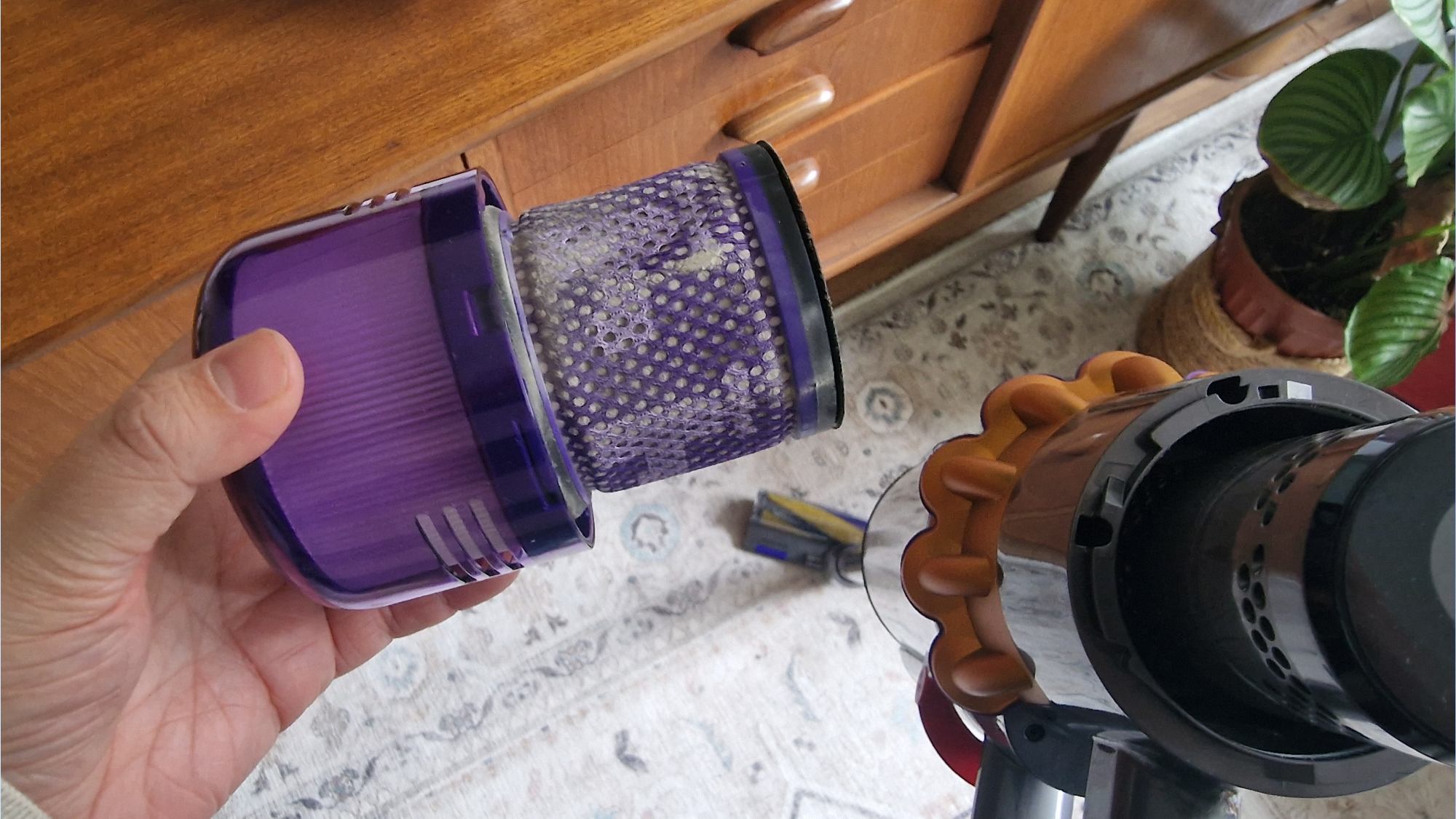
Where is the filter on a Dyson vacuum?
The filter may be near the top, rear, side, or motor housing, depending on the Dyson design. A vacuum can have more than one filter.
| Dyson vacuum type | Common filter locations | What to check |
|---|---|---|
| Cordless stick | Top of the motor, rear of the motor, or both | Some models use a pre-filter and a post-filter |
| Handheld | Near the motor or inside the dust bin area | Follow the model guide before removal |
| Upright | Inside the housing, near the dust bin, or at the rear | Some uprights use separate pre- and post-motor filters |
| Canister | Near the motor and exhaust area | The filter may sit behind a cover |
| Cinetic models | Model-specific | Do not assume the filter arrangement matches another Dyson |
A pre-motor filter protects the motor from dust before air reaches it. A post-motor filter, sometimes called an exhaust filter, cleans air after it leaves the motor. Some Dyson machines use only one filter, while others use two.
Do not use the vacuum with a filter removed. A missing filter can allow dust into the motor and may cause damage.
How to clean a washable Dyson filter
Cleaning is the usual first step when a washable Dyson filter looks dusty, airflow is weak, or the vacuum displays a filter warning.
1. Turn off and disconnect the vacuum
Switch off the vacuum. Unplug corded models. Remove the charger from cordless models and let the machine cool if it has been running.
2. Remove the filter
Locate the filter and turn it in the direction shown by the arrows or symbols. Many Dyson cordless filters release with a quarter-turn, but the exact motion differs.
Pull the filter straight out once it is unlocked. If it does not move, stop and check the model instructions. Avoid using pliers or a screwdriver. Force can crack the filter housing.
3. Tap out loose dust
Hold the filter over a trash can and tap it gently. This removes loose surface dust before washing.
Do not strike the filter against a hard edge. A cracked frame or torn filter can let dust pass into the motor.
4. Rinse with cold water
Rinse the filter under cold running water. Move the filter around so water reaches the pleats or foam.
Use water only unless Dyson specifically gives different instructions for your model. Do not add:
- Dish soap
- Laundry detergent
- Bleach
- Disinfectant
- Fragrance
- Cleaning sprays
These products can leave residue, damage filter material, or create foam inside the vacuum.
5. Remove excess water gently
Shake the filter lightly over a sink. You can press soft foam gently, but do not twist, wring, or crush the filter.
The filter does not need to look new. It needs to be free of loose dust and fully dry.
6. Dry the filter completely
Place the filter in a warm, dry area with good airflow. Leave it to dry for at least 24 hours. A longer drying time may be needed in a humid room or when the filter is thick.
Do not dry the filter with:
- A hair dryer
- A heater
- A clothes dryer
- Direct high heat
- An oven
- A microwave
Heat can shrink or deform the filter.
7. Reinstall the dry filter
Check the filter before fitting it back. It should feel dry, have no strong musty smell, and show no cracks or tears.
Insert it in the correct direction and twist or press it into place until it is secure. If your Dyson uses two filters, reinstall both.
8. Test the vacuum
Turn on the vacuum and check for:
- Normal suction
- No filter warning
- No unusual motor noise
- No air leaking around the filter
- No dust blowing from the exhaust
If the vacuum still has poor suction, the filter may not be the only cause.
When should you replace the filter instead?
Replace the filter when it is:
- Torn, split, or cracked
- Deformed and unable to seal
- Permanently gray or clogged after washing
- Smelly after complete drying
- Missing part of its frame
- Not approved for washing
- Still causing a filter warning after correct cleaning
Use a filter made for the exact Dyson model. A filter that looks similar may not seal correctly or may restrict airflow.
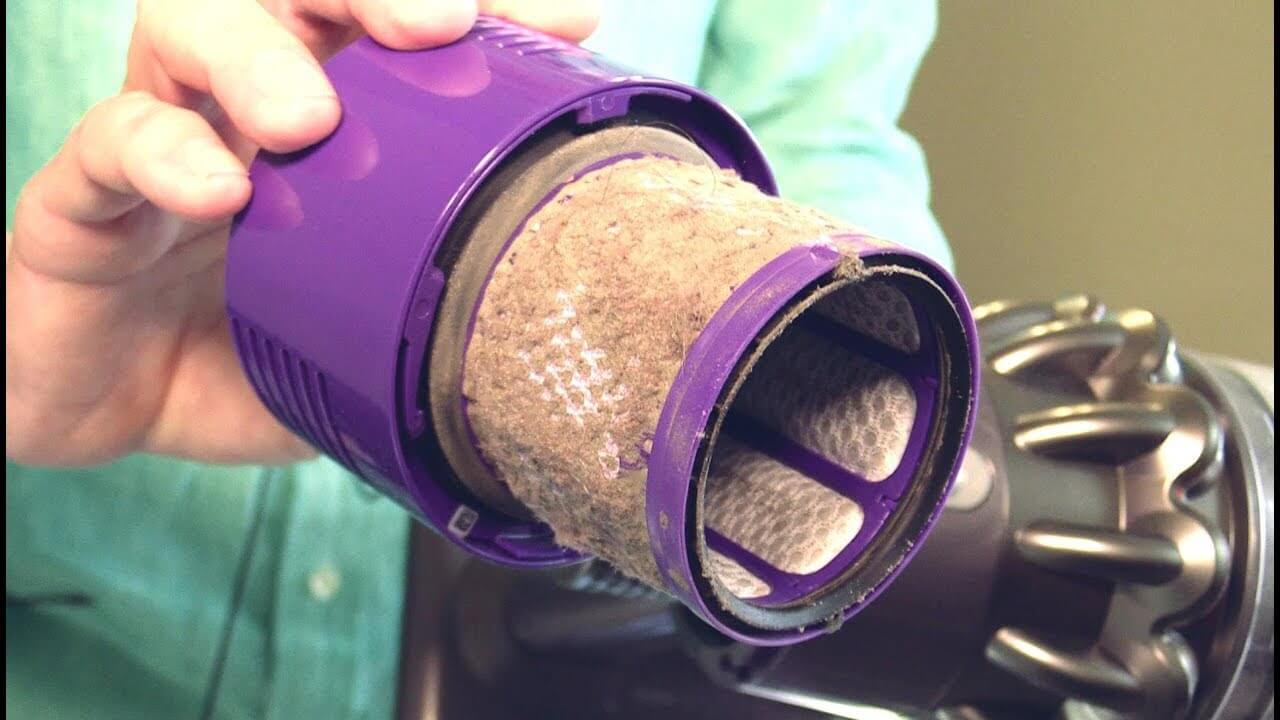
How to replace a Dyson vacuum filter
Replacing a Dyson filter is similar to removing a washable filter, but the old filter is discarded instead of rinsed.
- Turn off the vacuum and disconnect all power.
- Identify the correct replacement filter for the exact model.
- Remove the old filter by following the release mark or instruction in the manual.
- Compare the new filter with the old one.
- Confirm that the seals, tabs, and frame match.
- Insert the new filter in the same direction.
- Twist or press it until it locks.
- Run the vacuum briefly and check for air leaks or warnings.
Do not throw away the old filter until the new one fits. Comparing both parts can reveal a wrong model or missing seal.
Dyson filter replacement by vacuum type
The general process is similar, but the details change by product family.
Dyson cordless stick vacuums
Cordless Dyson models often have one filter near the motor and may have another filter at the rear. Many models use a removable top filter that twists out.
Some cordless models require regular filter washing. Dyson instructions for several cordless ranges specify monthly filter washing, but the correct interval depends on the model, dust level, and use. Homes with pets, remodeling dust, fireplaces, or fine powder may need more frequent checks.
Dyson upright vacuums
Dyson upright vacuums may have a filter near the dust bin and another near the base or exhaust. The filter cover may use a twist lock, latch, or button.
Keep the upright unplugged while removing filters. Uprights can have more parts around the brush bar and motor housing, so do not open covers that are not identified as filter access points.
Dyson canister vacuums
A Dyson canister may use a pre-motor filter and a post-motor filter. One may sit near the dust container, while the other may be behind a motor or exhaust cover.
Check both locations during maintenance. Cleaning only the visible filter may not resolve restricted airflow.
Dyson handheld vacuums
Handheld Dyson vacuums often use a compact filter near the motor. The filter may be washable, but small replacement filters can look alike across models.
Confirm the part number or model compatibility before ordering.
How often should you clean or replace a Dyson filter?
Clean a washable filter when the model manual says to clean it and whenever it becomes visibly dusty. Many Dyson cordless instructions use a monthly washing schedule, but this is not a universal rule for every Dyson vacuum.
Inspect the filter more often if you:
- Vacuum every day
- Have shedding pets
- Clean a large home
- Pick up fireplace ash or fine dust
- Have recently done construction or sanding
- Notice a filter warning
- Notice reduced suction
A washable filter may last for a long time if it remains intact and seals well. Replace it when cleaning no longer restores airflow or when the filter is damaged.
A simple maintenance plan is:
| Task | Suggested action |
|---|---|
| Quick inspection | Check the filter when emptying the dust bin |
| Washing | Follow the exact Dyson model guide; many cordless models use a monthly interval |
| Drying | Allow at least 24 hours before reuse |
| Replacement | Replace when damaged, permanently clogged, or still causing poor performance |
These are maintenance guidelines, not a substitute for the instructions for your model.

What to do if the Dyson still has low suction
A clean filter does not guarantee strong suction. If performance remains poor, check the following in order.
1. Confirm the filter is dry
A damp filter can restrict airflow and may damage the vacuum. Remove it and check the thickest part by touch. If there is any doubt, leave it out longer.
2. Check the dust bin
An overfilled dust bin can block airflow. Empty it according to the model instructions. Remove packed dust from the bin inlet without damaging the seals.
3. Inspect the wand and hose
Disconnect the wand or hose where allowed. Look through the opening for hair, paper, toys, or compacted debris.
Do not push a sharp object through the hose. It can puncture the hose or damage an internal seal.
4. Check the cleaner head
Turn off the vacuum before inspecting the brush bar. Remove wrapped hair and thread from the brush bar if the model allows it.
Some Dyson cleaner heads have a removable brush bar. Do not open a sealed motorized head unless the manual says it is user-serviceable.
5. Look for air leaks
Check the filter seal, dust bin, wand connections, and hose joints. A loose part can cause a hiss and reduce suction.
6. Check the battery and settings
On cordless models, low battery power, an unsuitable power mode, or a worn battery can affect runtime and cleaning performance. A filter wash will not correct a battery problem.
7. Contact Dyson support
Contact Dyson or an authorized service provider if the vacuum:
- Smells like burning
- Sparks
- Gets unusually hot
- Makes a grinding sound
- Shows a warning after the filter is clean and dry
- Has a damaged power cord
- Has a cracked battery or housing
Do not continue using a vacuum that smells of burning or shows electrical damage.

Common mistakes when changing a Dyson filter
Washing a filter that is not washable
The word “filter” does not automatically mean “washable.” Confirm the feature for your exact model.
Reinstalling the filter while damp
This is one of the most serious errors. Moisture can restrict airflow and reach electrical parts. Wait until the filter is fully dry.
Using soap or chemicals
Soap can leave a film that traps dust and changes airflow. Use cold water only unless the model instructions say otherwise.
Installing the wrong filter
Filters for a V8, V10, V11, or V15 may look similar but are not automatically interchangeable. Model compatibility matters.
Running the vacuum without a filter
This can send dust into the motor and may void warranty coverage or cause damage.
Forcing the filter loose
If the filter does not twist or pull out easily, stop. Look for a latch, arrow, or model-specific removal method.
Confusing a filter warning with a full diagnosis
A warning may point to a dirty filter, but it can also result from a blockage, poor seal, damp filter, or sensor issue.
Frequently asked questions
Can I wash a Dyson vacuum filter in the washing machine?
No. Wash a Dyson filter by hand with cold water only when the exact model instructions say it is washable. A washing machine can tear or deform the filter.
Can I use my Dyson without the filter?
No. Keep every required filter installed before operating the vacuum. The filter protects the motor and helps prevent dust from returning to the room.
How long does a Dyson filter take to dry?
Dyson filter instructions commonly call for at least 24 hours of air-drying. Thick filters or humid conditions may require more time. Do not use artificial heat to speed up drying.
Why does my Dyson smell after I clean the filter?
The filter may still be damp, or the odor may come from the dust bin, brush bar, hose, or another blocked area. Let the filter dry fully, then inspect the rest of the airflow path.
Can I wash a Dyson filter with hot water?
Use cold water unless Dyson’s instructions for your exact model state otherwise. Hot water may damage or deform some filter materials.
How do I know which Dyson filter to buy?
Find the full model name and serial number, then use the Dyson US support or parts page to confirm compatibility. Do not rely on appearance alone.
Final takeaway
To change a filter on a Dyson vacuum cleaner, disconnect the machine, remove the filter carefully, and confirm whether it is washable. Rinse an approved washable filter with cold water only, let it air-dry for at least 24 hours, and reinstall it securely. Replace filters that are damaged, permanently clogged, or not designed to be washed.
If the vacuum still loses suction after the filter is clean and dry, inspect the dust bin, wand, hose, cleaner head, seals, and battery. When the model instructions differ from this general guide, follow the official Dyson instructions for your specific US model.

Liora Pennings is a seasoned chef and kitchen enthusiast with a passion for turning everyday cooking into an effortless experience. With years of hands-on culinary expertise, she specializes in practical techniques, ingredient know-how, and smart kitchen solutions that help home cooks elevate their meals. At KitchFlair.com, Liora shares her best tips, time-saving tricks, and honest product reviews to guide readers toward a more efficient, enjoyable, and inspired cooking routine. Whether you’re a beginner or a seasoned home chef, Liora’s friendly, knowledge-packed insights make every visit to the kitchen a little easier—and a lot more delicious.