How To Clean Vacuum Cleaner Internal Fan Safely: Step Guide
Unplug the vacuum, follow the manual, wear a mask, remove debris, and clean the fan with soft tools.
I have serviced dozens of vacuums for friends and clients. I know how to clean vacuum cleaner internal fan safely and keep machines running well. This guide explains step by step how to clean vacuum cleaner internal fan safely, why it matters, and what to avoid. Read on for practical tips, tools, and a safe cleaning plan anyone can follow.

Why cleaning the fan matters
A dusty or clogged fan lowers suction. It strains the motor and shortens the vacuum's life. Regular cleaning improves airflow and removes odors. Knowing how to clean vacuum cleaner internal fan safely protects you and the machine.
Common signs the fan needs cleaning:
- Reduced suction
- Burning or wet smells
- Loud or uneven noise
- Excess heat from the motor
I once cleaned a client’s machine that smelled burnt. The fan blades were packed with pet hair. After a careful clean, suction returned and the motor ran cooler.
Safety precautions before you start
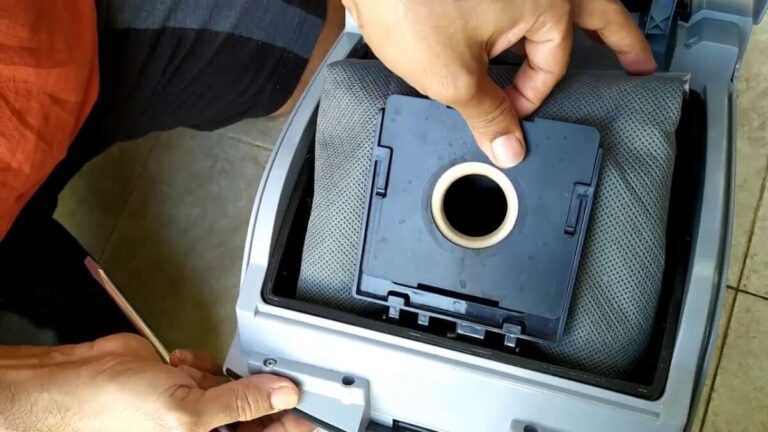
Never skip safety steps when you learn how to clean vacuum cleaner internal fan safely. Unplug the vacuum and remove the bag or canister first. Work in a well-lit area and wear gloves and a dust mask if you have allergies. Keep small parts in a tray so they don’t get lost.
Always consult the user manual. Some manufacturers void warranties if you open sealed parts. If the fan housing is welded or sealed, do not force it open. Contact an authorized service center in that case.

Tools and materials you’ll need
Gather the right tools before you begin. Using the wrong tool can damage plastic blades or motor fins.
Essential items:
- Soft brush or small paintbrush to remove dust
- Compressed air canister or gentle air blower
- Microfiber cloths for wiping
- Screwdrivers sized for your model
- Cotton swabs for tight spots
- Isopropyl alcohol 70% for grease removal, used sparingly
- Dust mask and nitrile gloves for protection
- Small container for screws and clips
Optional helpful items:
- Vacuum with crevice tool for pre-cleaning
- Replacement foam filters if old or damaged
Step-by-step: how to clean vacuum cleaner internal fan safely
Follow these steps carefully. Each step keeps you safe and protects the fan.
- Prepare and unplug
- Turn off the vacuum and unplug it.
- Empty the dustbin or replace the bag.
- Remove visible debris from the inlet and hose.
- Access the fan
- Read the manual for access points.
- Remove the housing screws slowly.
- Keep all screws and fasteners together in a small dish.
- Inspect the fan and motor
- Look for hair, string, or packed dust on the fan blades.
- Check for cracks, chips, or warped blades.
- Smell for burned insulation which may indicate deeper issues.
- Remove loose debris
- Use a soft brush to sweep away loose dust.
- Use compressed air in short bursts to blow out crevices.
- Point the air from the inside out to avoid packing dust deeper.
- Deep clean the blades
- Lightly dampen a microfiber cloth with water or 70% isopropyl alcohol.
- Wipe each blade gently. Do not soak the motor or bearings.
- Use cotton swabs for blade roots and tight corners.
- Clean housing and intake ports
- Wipe the fan housing and intake ports with a dry cloth.
- Remove lint from filters and filter housings.
- Replace disposable filters or wash reusable ones per instructions.
- Reassemble carefully
- Let all parts dry completely before reassembly.
- Reinstall screws in the reverse order.
- Run a short test on low power to check for wobble or noise.
- Final check
- If you hear grinding or feel vibration, stop and inspect again.
- If the motor runs hot or emits smoke, unplug and seek professional service.
I learned to use short bursts of compressed air. Long blasts forced dust into bearings. That mistake taught me to be gentle.
Common mistakes and troubleshooting
Avoid common errors when you learn how to clean vacuum cleaner internal fan safely. A wrong move can harm the motor or void a warranty.
Common mistakes:
- Forcing sealed housings open
- Using water directly on motor components
- Over-oiling or using lubricants near dust paths
- Reassembling with missing screws or misaligned parts
Troubleshooting tips:
- Persistent noise after cleaning may mean bent blades or worn bearings.
- Continued weak suction could be a clogged hose, not the fan.
- Burning odors after cleaning mean stop and consult a pro.

Routine maintenance schedule
A simple routine keeps your fan clean and extends vacuum life. Set reminders so you don’t forget.
Suggested schedule:
- Weekly: Empty dust bin or replace bag; check intake and hose.
- Monthly: Inspect filters and wash or replace as needed.
- Every 3–6 months: Open the housing and clean the internal fan if you use the vacuum often.
- Annually: Consider a professional checkup if you use the vacuum heavily.
My tip: mark a day on the calendar. Checking the fan every three months saved me from a costly motor replacement.
Frequently Asked Questions of how to clean vacuum cleaner internal fan safely
How often should I clean the internal fan?
Clean the internal fan every 3–6 months for regular home use. Clean sooner if you have pets or heavy debris.
Can I use water to clean the fan?
Avoid using water on the motor or bearings. Use a lightly dampened cloth only on non-electrical parts and let everything dry fully.
Is it safe to use compressed air?
Yes, if used in short bursts and from the right direction. Avoid high-pressure blasts that can force debris deeper into the motor.
Will cleaning the fan void my warranty?
It depends on the manufacturer. Check your manual; do not open sealed housings if the manual warns against it.
What if the fan is damaged?
If blades are cracked or bearings feel rough, stop and get professional repair. Running a damaged fan can ruin the motor.
Can I clean the fan myself if I’m not handy?
Yes, with caution. Follow the manual, use the right tools, and work slowly. If unsure, get help from an authorized service center.
Conclusion
Cleaning your vacuum’s internal fan is a simple way to restore suction, reduce odor, and prolong the machine’s life. Use the right tools, follow safety steps, and consult the manual. Take action this week: inspect your vacuum, schedule a clean, or leave a comment with your model and I’ll share specific tips.

Liora Pennings is a seasoned chef and kitchen enthusiast with a passion for turning everyday cooking into an effortless experience. With years of hands-on culinary expertise, she specializes in practical techniques, ingredient know-how, and smart kitchen solutions that help home cooks elevate their meals. At KitchFlair.com, Liora shares her best tips, time-saving tricks, and honest product reviews to guide readers toward a more efficient, enjoyable, and inspired cooking routine. Whether you’re a beginner or a seasoned home chef, Liora’s friendly, knowledge-packed insights make every visit to the kitchen a little easier—and a lot more delicious.