How To Program Cuisinart Coffee Maker: Easy Setup Guide
To program a Cuisinart coffee maker, set the clock, choose a brew time, and press the Program or Auto On button.
Learning how to program a Cuisinart coffee maker takes only a few minutes, even if the control panel looks busy at first. I have worked through several Cuisinart programmable models, and the process is much like setting a simple alarm clock: enter the current time, choose when you want coffee, and activate the schedule. This guide explains each step, common button labels, useful settings, and easy fixes when the timer does not work as expected.
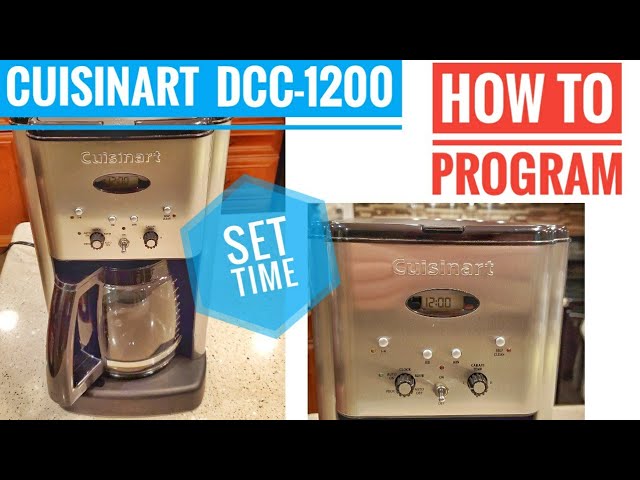
How to program a Cuisinart coffee maker: The basic method
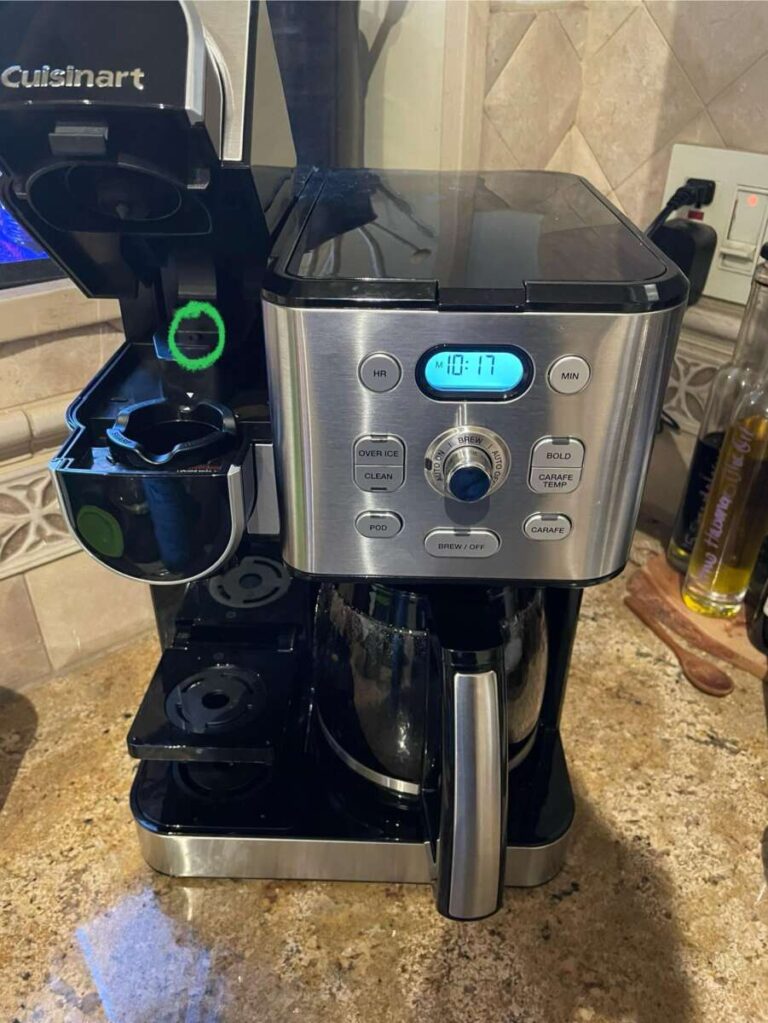
Most Cuisinart programmable coffee makers use the same general process. The button names may differ slightly by model, but the key controls are usually labeled Clock, Program, Hour, Minute, and Auto On.
Before you begin, plug in the coffee maker and make sure the display is visible. If the clock flashes, the machine needs the current time before the automatic brew feature can work correctly.
Follow these steps:
- Press and hold the Clock button.
- Use the Hour button to set the current hour.
- Use the Minute button to set the current minute.
- Release the Clock button or press it again, depending on the model.
- Press and hold the Program button.
- Set the hour for your desired brew time.
- Set the minute for your desired brew time.
- Press the Program button again or press Auto On.
- Check that the programmed time or Auto On indicator appears on the display.
For example, if you want coffee at 6:30 a.m., set the program time to 6:30 and confirm that the display shows the automatic brewing symbol or indicator.
The most common mistake is setting the clock but never activating the program. A saved time does not always mean the timer is turned on. Look for an Auto On light, a clock icon, or a small programmed-time display.
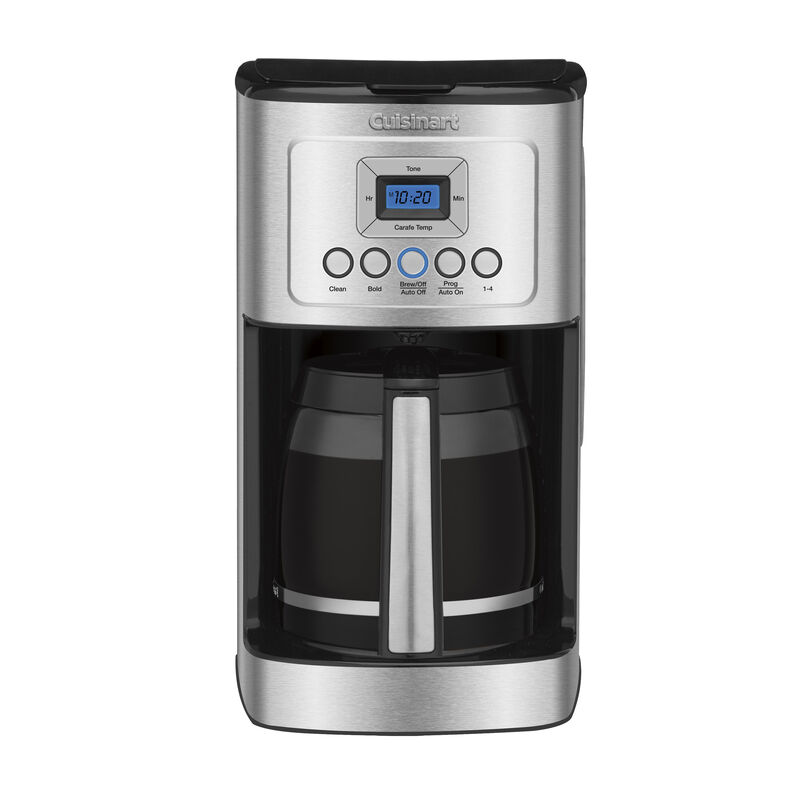
Set the clock correctly
The clock is the foundation of the entire timer system. If it shows the wrong time, your Cuisinart coffee maker may brew early, late, or in the wrong part of the day.
Step 1: Find the Clock button
Look for a button labeled Clock or Hour/Minute near the display. On some models, the Clock button must be held down while you adjust the time.
Step 2: Choose AM or PM
Many Cuisinart coffee makers use a 12-hour clock. Watch the display for an AM or PM symbol. Setting 6:00 without checking AM or PM could mean waking up to coffee at 6:00 p.m.
A useful trick is to set the clock while thinking aloud: “It is 7:45 in the morning.” This sounds simple, but it helps prevent the common AM and PM error.
Step 3: Save the time
Release the Clock button after setting the correct time. Some machines save the setting automatically after a few seconds. Others require another press of the Clock button.
If the clock continues flashing, the setting may not be saved. Repeat the process and check the instruction label on the front panel or the manual for your model.
/SPR-cuisinart-coffee-maker-how-to-clean-7507784-Hero-dc7623f557f5417e967413c2e08cdcc7.jpg)
Program the automatic brew time
Once the clock is correct, you can program the time for your next pot. This is the main part of learning how to program a Cuisinart coffee maker.
Use this sequence:
- Press and hold Program.
- Adjust the hour with the Hour button.
- Adjust the minutes with the Minute button.
- Confirm the time by pressing Program again.
- Press Auto On if your model has a separate Auto On button.
The machine should now be ready to brew at the selected time. Add water to the reservoir, place a paper or permanent filter in the filter basket, and add ground coffee before going to bed.
The timer does not usually measure coffee or water for you. It only starts the brewing cycle. The water and coffee must already be in place.
For a standard 12-cup model, many people use about 1 level tablespoon of ground coffee per 5 to 6 ounces of water. You can adjust this amount based on taste, roast level, and the markings on your machine.

Use the Auto On and Program buttons
Cuisinart control panels can be confusing because Program and Auto On may perform different jobs.
The Program button usually lets you enter or change the desired brew time. The Auto On button activates that saved time. Some models combine both functions, while others require you to press each button separately.
After programming the machine, check for one of these signs:
• Auto On appears on the screen
• A small clock icon is visible
• A green or amber indicator light turns on
• The programmed brew time remains on the display
If none of these signs appear, the schedule may not be active. Press Auto On once and wait a few seconds. Avoid pressing random buttons repeatedly because this can cancel the setting on some models.
To cancel automatic brewing, press Auto On again. The saved time may remain stored, but the machine will not start until Auto On is activated again.

Program special Cuisinart coffee maker settings
Many Cuisinart machines include extra settings that change how the coffee maker operates. These settings are helpful, but they do not replace the main programming steps.
Brew strength
The Brew Strength button may offer Regular and Bold options. Bold mode often uses a slower brewing process to create a stronger cup.
Choose Regular for a balanced brew and Bold for dark roasts or a fuller taste. The best setting depends on your coffee, grind size, and personal preference.
The 1–4 cup setting
The 1–4 Cup button is designed for smaller batches. It may adjust the brewing process so the machine can extract a small amount of coffee more effectively.
Press this option when brewing only one to four cups. Do not use it for a full carafe unless your manual specifically says it is suitable.
Auto Off
Auto Off controls how long the coffee maker keeps the warming plate on after brewing. A shorter time can improve safety and reduce the chance of burnt coffee.
If you prefer fresh coffee, set Auto Off for a reasonable period and pour the coffee into a thermal carafe when possible. Never leave the machine unattended for long periods unless the model is designed for that use.
Brew pause
Many Cuisinart models include a brew-pause feature. It lets you remove the carafe briefly during brewing and pour a cup.
Place the carafe back quickly. Removing it for too long may cause coffee to drip onto the warming plate or interrupt the brewing cycle.
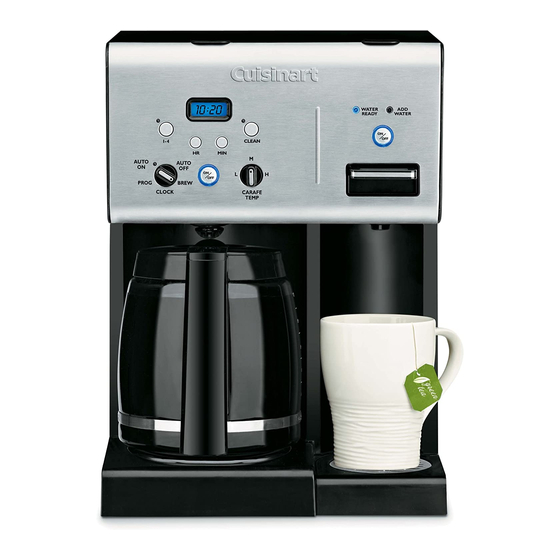
Prepare the coffee maker the night before
Programming works best when the coffee maker is fully prepared before the automatic start time.
Use this simple checklist:
• Fill the reservoir with fresh, cold water
• Add the correct paper or permanent filter
• Add freshly ground coffee
• Make sure the carafe is seated properly
• Close the filter basket lid
• Confirm the clock shows the correct AM or PM time
• Confirm Auto On is active
Do not add water above the maximum fill line. Too much water can overflow the basket or produce a weak, messy brew.
Also, do not leave used grounds in the basket overnight. Old grounds can create a stale smell and make the next pot taste flat. Empty and rinse the basket after each use.
In hands-on testing, the carafe position is one of the easiest details to overlook. If the carafe is not pushed fully into place, the coffee maker may drip slowly, stop brewing, or fail to operate properly.
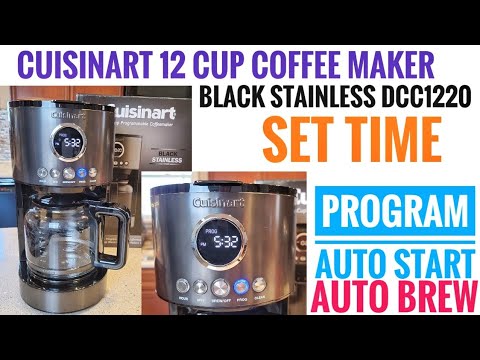
How to program a Cuisinart coffee maker after a power outage
A power interruption may reset the clock and erase the programmed brew time. Some models have a short-term memory feature, but you should not depend on it.
After a power outage:
- Check whether the display is flashing.
- Reset the current clock time.
- Re-enter the automatic brew time.
- Press Auto On.
- Confirm that the indicator or clock icon appears.
If the machine loses its settings every time it is unplugged, that may be normal for the model. If it loses the time during a brief outage or while still plugged in, check the power cord, outlet, and manual.
Use a wall outlet that fits the plug securely. Avoid loose extension cords, shared outlets with high-power appliances, or outlets controlled by a wall switch.
Troubleshoot a Cuisinart coffee maker timer
When the timer does not work, the cause is often a small setting error rather than a serious fault.
The coffee maker brews at the wrong time
Check the AM and PM setting first. Then compare the clock time with another accurate clock. Daylight saving time can also make the schedule appear incorrect if the clock was not updated.
The programmed time disappears
The machine may not have saved the setting. Hold the Program button again, enter the time, and press Auto On to activate it.
The machine does not brew automatically
Confirm that water, coffee, and the filter are in place. Then make sure the carafe is correctly positioned and Auto On is active.
The display is blank
Check the outlet and circuit breaker. Try another outlet, but do not use the coffee maker if the cord is damaged, the plug is hot, or you smell burning plastic.
The coffee maker beeps but does not start
A lid, basket, or carafe may not be seated correctly. Turn the machine off, allow it to cool, and check each removable part before trying again.
Clean the coffee maker for reliable programming
A clean machine is more likely to brew at the expected speed and temperature. Mineral buildup can slow water flow and affect the automatic brewing cycle.
Clean removable parts with warm, soapy water after the machine cools. Rinse the carafe, filter basket, and lid well.
For mineral deposits, run the cleaning cycle according to your model’s instructions. Many Cuisinart machines use a Clean button and a cleaning solution approved for coffee makers. Never mix cleaning products, bleach, or household chemicals.
After the cleaning cycle, run one or two full cycles with clean water. This removes leftover cleaning solution and prevents an unusual taste.
Coffee oils also build up over time. Even if the machine looks clean, the carafe lid and filter basket can hold old oils that make fresh coffee taste bitter.
Mistakes to avoid when programming
Learning how to program a Cuisinart coffee maker is easy once you avoid a few common mistakes.
• Setting the brew time before setting the clock
• Choosing 6:00 without checking AM or PM
• Programming the time but not pressing Auto On
• Forgetting to add water before bedtime
• Filling the reservoir above the maximum line
• Leaving the carafe off the warming plate
• Using a filter that does not fit the basket
• Ignoring mineral buildup
• Assuming every Cuisinart model uses identical buttons
The exact steps can vary between models such as 12-cup glass-carafe machines, thermal-carafe machines, and specialty coffee makers. When the buttons do not match this guide, use the model number to find the correct manual.
The model number is often printed on the underside or back of the machine. It may also appear on the original box or purchase record.
Tips for better-tasting automatic coffee
A timer can make mornings easier, but good coffee still depends on the basics.
Use fresh beans and grind them just before brewing when possible. A medium grind usually works well for standard drip coffee makers. A grind that is too fine may slow the water flow, while a grind that is too coarse may produce weak coffee.
Use clean, cold water. Filtered water can help if your tap water has a strong taste or high mineral content. However, avoid distilled water unless the manufacturer specifically permits it, since some coffee makers need minerals for proper operation.
Store coffee in an airtight container away from heat, light, and moisture. Do not store it in the refrigerator, where it can absorb odors and condensation.
In my practical experience, the biggest flavor improvement often comes from cleaning the machine and using better water. Many people change the coffee brand first, but old oils and scale may be the real problem.
Is it safe to leave a programmed coffee maker overnight?
Most modern programmable coffee makers are designed to start automatically when properly set up. Still, safe use depends on the machine’s condition and the manufacturer’s instructions.
Before using the timer, inspect the cord, plug, carafe, and warming plate. Do not use the machine if any part is cracked, damaged, wet, or unusually hot.
A thermal carafe can reduce the need for a hot warming plate. If your model uses a glass carafe, use the Auto Off setting and keep the area around the coffee maker clear.
Never place the coffee maker near a sink full of water, a hot stovetop, or loose paper towels. Basic care matters as much as correct programming.
Frequently Asked Questions
How do I program a Cuisinart coffee maker for the first time?
Set the current time with the Clock, Hour, and Minute buttons. Then hold Program, enter the desired brew time, and press Auto On to activate the schedule.
Why is my Cuisinart coffee maker not turning on automatically?
The Auto On feature may not be active, even if a brew time is saved. Check for the Auto On light or clock icon, and confirm that the current clock time and AM/PM setting are correct.
Can I program my Cuisinart coffee maker to brew only one cup?
Many models include a 1–4 Cup setting for smaller batches. Select that option before programming or brewing, but check your model’s manual because controls vary.
Does a Cuisinart coffee maker remember the programmed time?
Some models keep the programmed time in memory, while others may reset after a power outage or unplugging. Always check the display and reactivate Auto On when needed.
How do I cancel the automatic brew setting?
Press the Auto On button again to turn off the scheduled brew cycle. On some models, the saved time remains available for later use.
Why does my programmed coffee maker brew at noon instead of morning?
The clock or brew time is likely set to the wrong AM or PM period. Reset both times and confirm the display before activating Auto On.
How often should I clean a Cuisinart coffee maker?
Clean removable parts after regular use and run the machine’s cleaning cycle when the clean indicator appears or mineral buildup develops. Homes with hard water may need more frequent cleaning.
Conclusion
Programming a Cuisinart coffee maker follows a simple pattern: set the current clock, choose the automatic brew time, prepare the water and coffee, and turn on Auto On. Always check AM and PM, confirm the timer indicator, and keep the machine clean for steady performance.
Once you learn how to program a Cuisinart coffee maker, your morning routine can feel smoother and less rushed. Try the steps tonight, check the schedule before bed, and explore your model’s brew strength, 1–4 cup, and Auto Off settings for a better cup tomorrow.

Liora Pennings is a seasoned chef and kitchen enthusiast with a passion for turning everyday cooking into an effortless experience. With years of hands-on culinary expertise, she specializes in practical techniques, ingredient know-how, and smart kitchen solutions that help home cooks elevate their meals. At KitchFlair.com, Liora shares her best tips, time-saving tricks, and honest product reviews to guide readers toward a more efficient, enjoyable, and inspired cooking routine. Whether you’re a beginner or a seasoned home chef, Liora’s friendly, knowledge-packed insights make every visit to the kitchen a little easier—and a lot more delicious.