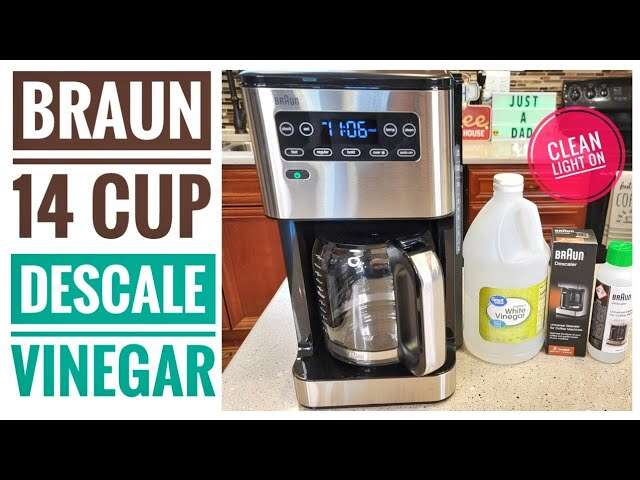
How To Clean Braun Coffee Maker With Clean Button: Easy Fix
Use the Clean button with vinegar solution, then run cycles until the light turns off.
I’ve cleaned dozens of Braun machines and taught others to do it. In this guide I’ll walk you step by step through how to clean Braun coffee maker with clean button, why the button helps, when to descale, and what to do if the light won’t reset. Read on for practical tips, troubleshooting, and clear routines that keep your coffee tasting fresh.
Why use the Clean button on your Braun coffee maker
The Clean button automates the descaling reminder and runs a rinse cycle meant to loosen mineral buildup. It helps protect internal heating parts and keeps water flow steady. Using the Clean button regularly prevents slow brews, odd tastes, and shorter machine life. I recommend using it as part of a simple schedule so you don’t wait until the machine clogs.

What you need before you start
- A Braun-approved descaling solution or white vinegar (50/50 water-vinegar mix for mild buildup).
- Fresh water for multiple rinse cycles.
- A large container or the carafe to catch water.
- Soft cloth and a small brush for the filter basket and exterior.
- Protective gloves and good ventilation if you use vinegar.
Step-by-step: how to clean Braun coffee maker with clean button
- Empty the machine. Remove old grounds, discard the filter, and empty the carafe.
- Fill the tank. Pour the descaling solution or a 50/50 vinegar-water mix into the water reservoir.
- Place the carafe under the brew head to catch the liquid.
- Press the Clean button. Most Braun models start a descaling/clean cycle that runs water through the system. Follow the machine’s prompts if it blinks or pauses.
- Let the cycle finish. The machine may run several short cycles and pause — this is normal as it treats buildup.
- Rinse thoroughly. After the Clean cycle ends, empty the carafe, fill the reservoir with fresh water, and run at least two full water-only cycles to flush residue.
- Wipe and reassemble. Clean the filter basket and exterior with a damp cloth and reinsert all parts.
- Check the Clean light. The indicator should reset after the rinse cycles. If it stays on, run another water cycle or repeat the descaling with a commercial descaler.
This routine shows how to clean Braun coffee maker with clean button quickly and safely. Running fresh water cycles afterward protects flavor and prevents vinegar or descaler taste.

Deep descaling and when to go beyond the Clean button
The Clean button handles light to moderate limescale. If you notice slow flow, noisy pumps, or bitter taste, do a deeper descale:
- Use a commercial descaler at full strength following product directions for heavy buildup.
- Disassemble removable parts like the shower screen and clean with a brush for stubborn deposits.
- Soak the carafe lid, filter basket, and other removable parts in warm soapy water.
If repeated Clean cycles don’t restore flow, a full manual descaling or professional service may be needed. Heavy mineral buildup can hide in hard-to-reach tubing and may require more aggressive treatments.
Troubleshooting: Clean button won’t work or light won’t reset
- Clean light stays on after cycles: Run 2–3 plain water cycles. If it persists, repeat descaling with a commercial product.
- Clean button doesn’t start cycle: Unplug the machine for 60 seconds, then plug in and try again. Check that the reservoir is seated correctly.
- Machine errors mid-cycle: Pause, let the machine cool, and inspect for clogs in the filter basket or carafe area. Clear any blockages and restart.
- Persistent flow issues: Inspect the spray head and tubing. If you’re uncomfortable, contact Braun support or a certified repair shop.
These fixes cover most issues when you follow how to clean Braun coffee maker with clean button but still run into trouble.

Maintenance tips to keep your Braun coffee maker running smoothly
- Do a Clean-button descaling every 1–3 months depending on water hardness.
- Empty and rinse the carafe daily and wash removable parts weekly.
- Use filtered water to reduce mineral buildup and reduce the frequency of descaling.
- Keep the exterior and warming plate free of coffee spills to avoid burnt residue.
- Replace permanent filters or paper filters as needed to avoid oils and grounds buildup.
Consistent care makes the Clean button more effective and extends machine life.
Personal experience: mistakes I made and lessons learned
I once waited too long between descaling cycles and the brew slowed to a drip. After a full commercial descale and extra rinses, the machine ran like new. Lesson: follow a simple schedule and use the Clean button as your first line of defense. Another tip I learned is to always run at least two fresh-water rinse cycles after descaling; it removes residue and prevents off-flavors. Treat the Clean button as a helpful automation, not a cure-all — combine it with small, regular maintenance.

Frequently Asked Questions of how to clean braun coffee maker with clean button
How often should I use the Clean button on my Braun coffee maker?
Use the Clean button every 1–3 months depending on how hard your water is and how often you brew. If you see the Clean light, run the cycle right away.
Can I use vinegar in the Braun Clean cycle?
Yes, a 50/50 water-vinegar mix is fine for light descaling, but rinse with multiple water cycles afterward to remove vinegar taste. For heavy scale, use a commercial descaler.
What if the Clean light won’t turn off after descaling?
Run two to three fresh-water rinse cycles. If it still stays on, try a commercial descaler or contact Braun support if the issue persists.
Is it safe to press Clean while the carafe is not in place?
No, always place the carafe or a container under the brew head before starting the Clean cycle to catch hot liquid and prevent spills.
Will the Clean button remove coffee oil buildup?
The Clean cycle focuses on mineral scale. For oil buildup, wash removable parts with warm soapy water and use a brush to clean the filter area.
My machine is still slow after cleaning with the Clean button. What next?
Try a full manual descaling with a commercial product and clean the spray head and tubing. If problems continue, a technician may need to inspect internal components.
Conclusion
Regular use of the Clean button is an easy, effective step in keeping your Braun coffee maker in top shape. Follow the step-by-step routine, rinse thoroughly after descaling, and combine automated cleaning with weekly care for the best results. Take action today: schedule a Clean-button cycle, switch to filtered water if possible, and enjoy better-tasting coffee tomorrow. Leave a comment about your experience or subscribe for more simple appliance care tips.

Liora Pennings is a seasoned chef and kitchen enthusiast with a passion for turning everyday cooking into an effortless experience. With years of hands-on culinary expertise, she specializes in practical techniques, ingredient know-how, and smart kitchen solutions that help home cooks elevate their meals. At KitchFlair.com, Liora shares her best tips, time-saving tricks, and honest product reviews to guide readers toward a more efficient, enjoyable, and inspired cooking routine. Whether you’re a beginner or a seasoned home chef, Liora’s friendly, knowledge-packed insights make every visit to the kitchen a little easier—and a lot more delicious.